Rewards
Withdraw Unetwork rewards your way
Choose PayPal, a crypto wallet, or a bank account. KYC is required for every withdrawal, and every UP is worth 1 USD.
PayPal
Receive network rewards through PayPal after completing the required identity verification.
PayPal limits
- Minimum withdrawal
- No minimum
- Maximum withdrawal
- No maximum
Crypto wallet
Complete identity verification, then send rewards to a wallet or crypto app in assets such as ETH, USDC, or BTC across supported chains.
Crypto limits
- Minimum withdrawal
- 5 UPs
- Max per withdrawal
- 150 UPs
Bank account
Receive rewards by direct bank transfer in USD, EUR, or GBP after identity verification.
Bank limits
- Minimum withdrawal
- 200 UPs
- Max per withdrawal
- 1000 UPs
- 24-hour max
- 1000 UPs
Crypto wallets
LiveCrypto payout wallet availability
Check funded crypto assets by chain before confirming a crypto wallet withdrawal.
Total available
--
Last updated
Checking live status...
Checking crypto payout wallet balances...
Start
Start from the management portal
Use the portal to sign in, choose your operator role, and check what is ready to withdraw.
Portal:manage.unetwork.io
- 1
Visit the management portal
Go to manage.unetwork.io and select GET STARTED to begin the rewards flow.
- 2
Choose your role
Select License Operator so the portal opens the reward dashboard for your active license or licenses.
- 3
Use the same sign-in method
Sign in with the same method you used in the Unetwork App, such as Web3 wallet or Email + OTP.
- 4
Review your totals
Check Redeemable Rewards for the amount available now and Total Rewards for your lifetime reward history.
Required first
Prepare your KYC submission
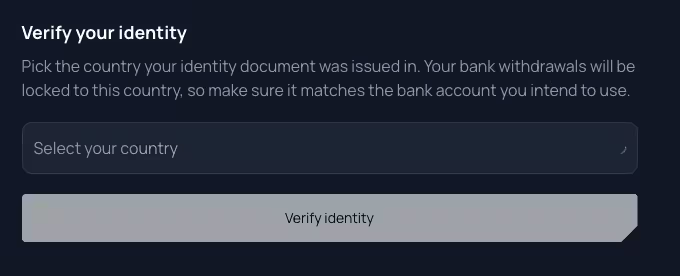
Identity verification is required for PayPal, crypto, and bank withdrawals. Complete it carefully before choosing where to receive your payout.
Give your submission the best chance of passing
- Upload the original PDF, or a clear photo or scan of the physical document. Do not upload screenshots or photos of a screen.
- Avoid statements exported directly from a banking app. Use an official PDF from your bank, a paper statement, utility bill, government letter, or rental agreement.
- Make sure the file is not password protected.
- Show the entire document with a small margin on every side. Keep it clear, well lit, and free from glare, shadows, blur, or obstructions.
- The document must show your full name, full residential address, issuer, and a date within the last three months.
- Enter your name and address in the KYC form exactly as they appear on the document, including spelling, order, and formatting.
If verification fails
If your first two submissions fail, ask for help in the operator Telegram group before attempting the third.
If the third submission also fails, contact support@unetwork.io.
- • Exact issue timestamp and timezone
- • License ID
- • Unetwork account email
- • Clear description of the problem or error
- • What you already tried
Never include passwords, verification codes, private keys, or wallet recovery phrases in a support request.
Withdraw
Choose your payout method
After KYC passes, choose PayPal, Crypto wallet, or Bank account and follow the method-specific details shown in the portal.
PayPal
PayPal flow
Use PayPal with no minimum or maximum withdrawal amount.
- 01
Select PayPal
Choose PayPal when the portal asks where to send your rewards.
- 02
Follow the portal prompts
Provide the PayPal account details requested by the portal and check them carefully.
- 03
Review and confirm
Review the destination, UP amount, USD value, and any details shown before submitting the payout.
- 04
Track the payout
Return to Rewards Overview to follow the payout and download its invoice when available.
Crypto
Crypto wallet flow
Use this route when you want UPs converted into a supported crypto asset and delivered to your wallet.
- 01
Select Crypto wallet
Choose Crypto wallet when the flow asks where to send your incentives.
- 02
Enter a wallet address
Paste a valid destination address. Crypto sent to the wrong address cannot be recovered.
- 03
Choose chain and asset
Select the supported network and payout asset, such as USDC, BTC, ETH, or another available option.
- 04
Review the live quote
Review the UP amount, USD value, asset amount, fee, and destination while the quote is still active.
- 05
Track the transaction
Save the transaction ID and return to Rewards Overview for pending or completed withdrawal history.
Fiat
Bank account flow
Use this route when you want UPs paid out by bank transfer in USD, EUR, or GBP.
- 01
Select Bank account
Choose Bank account when the flow asks where to send your incentives.
- 02
Resume or wait if needed
If the tab closes before completion, return to the same screen and resume. The portal waits for the partner flow to finish before unlocking bank details.
- 03
Add bank details after approval
Enter bank and account information only after KYC passes. Your name and country must match the verified identity and bank account.
- 04
Choose amount and currency
Enter the withdrawal amount, choose USD, EUR, or GBP, then save details for future withdrawals if you want the portal to remember them.
Bank details checklist
- Your details
- First name and last name must match the name on the bank account exactly.
- Account type
- Choose personal or business. For business accounts, include the business name and optional tax ID or registration number.
- Verified country
- Country of residence is locked to the country verified during KYC. Contact support if it needs to change.
- Address
- Enter the registered bank account address, including street, building number, city, province or state, and ZIP or postal code.
- Banking details
- Provide bank name, bank address, IBAN, BIC or SWIFT, and optional bank code where applicable.
Amount and currency
Bank withdrawals support USD, EUR, and GBP destination currency choices. The withdrawal amount is entered in UPs, and every UP is worth 1 USD.
Spend crypto
Spend a crypto payout with Oobit
For a simple crypto payout flow, send USDC to your Oobit wallet and use the Oobit virtual card after the payout arrives.
- 1
Create and verify Oobit
Open Oobit, create your account, complete verification, and find your Ethereum deposit address for USDC.
- 2
Add Oobit in Unetwork
Complete Unetwork identity verification first. Then, in the crypto withdrawal flow, paste your Oobit ETH address and select USDC as the payout asset.
- 3
Spend after the payout arrives
Once the funds reach Oobit, you can use the virtual card anywhere Visa is accepted in USD or other supported currencies.
Records
Download an invoice for every payout
The platform automatically generates invoices for PayPal, fiat, and crypto withdrawals.
Generated automatically
Each payout method receives the same clear record, so you do not need to create an invoice yourself.
Available in the platform
Download the invoice from your payout record when it becomes available.
Keep it with your records
The invoice can support accounting, bookkeeping, or tax recordkeeping requirements that apply to you.
Confirm
Confirm and track payout
All three payout methods end with a final review before the withdrawal is submitted.
Review the destination
Check the PayPal account, wallet address, or bank account, plus the UP amount, USD value, fees, and destination details before submitting.
Save the transaction ID
After confirmation, the portal shows a transaction ID you can use to track payout progress.
Check Rewards Overview
Return to Rewards Overview to see withdrawal history and follow completed or pending payouts.
Need help?
Ask other Unetwork operators on Telegram
If you get stuck with rewards, KYC, PayPal, wallet setup, or bank payout details, join the operator group and share what you see in the portal. Ask there before a third KYC attempt.